
Zeroing an EOTech holographic sight is easy just like zeroing a red dot sight. Follow this 3 step checklist to complete EOTech zeroing procedure.
Please make sure the optic is mounted securely on the firearm
- Collect shot groups at a set distance (zero for 25, zero for 36, zero for 50)
- Readjust and verify zero
- Learn the holdover
Step 1. Collect Shot Group Data
Set up the zeroing target with 1" grid. If no printer to print at home, just buy some here

Get an accurate read of the target distance to the bore of the rifle. Don't eyeball it, use a laser rangefinder to tell you exactly how far, so you don't waste your time walking downrange back and forth eyeballing the distance.

If ever wonder what happen to the point of impact when tilting the aim, read our test result article here
If zeroing for 25 yards, aim the 1 MOA dot reticle at the target and shoot 3 shots, then we measure how much you're off.


To help you stabilize the rifle during the zeroing process, this affordable BOG Deathgrip tripod helps a lot to get rid of any shaking or hand tremoring to get accurate zeroing data.
Step 2. Readjust & Verify Zero
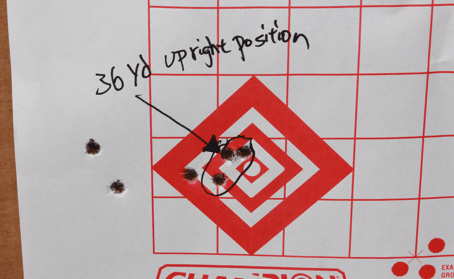
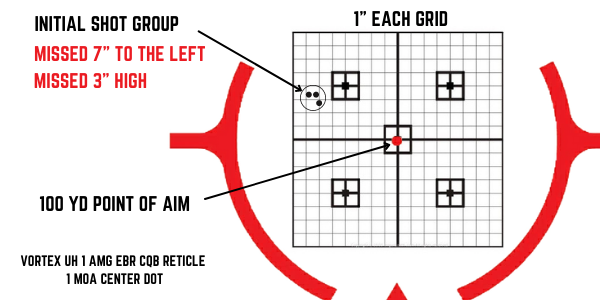
Then use this equation to find exactly how many clicks to dial the elevation and windage.

EOTech Click Value: 0.5 MOA / Click
Number of clicks to dial = {Distance Missed X 0.25 (25 yard)} / 0.5 MOA/Click
The turret direction label references the point of impact to the point of aim. If you do it the other way around, then the reticle moves in the opposite direction of the turn.
Roughly estimate how much the shot groups are off, try to get as close as you can. Like: 1.3" off, 0.7" off, or 0.5". Remember, a 0.5" off can be a lot of error as distance increases, so try to get as close as possible.
Recommend Magnifier Scope For Finer Zero


When you zero with a